
Everything You Need to Know About our Cookie Points Loyalty Scheme
24th Feb 2026
How to Get Cookie Points
You need to have an account and have signed up to the loyalty program. To do this just click the 'Earn Cookie Points' button in the bottom left of your screen.

Click the 'Join Now' button and create an account. It helps to add your birthday (day and month only...we're not that nosey!) and you'll get 24 extra points every birthday!
How to See Your Points
If you're logged in already, you'll see your cookie points in the top left section.
If you're not logged in, click the Sign In link and login. Click the main Earn Cookie Points button again to see your points.
How Do the Points Work?
For every cookie you buy, you get cookie points. Cookie points do NOT expire, so you can save them up and redeem them in a big chunk for a larger discount, or you can use them as you go and just benefit from smaller discounts more often.
As a general guide, buying 15 cookies gets you one free (in terms of points and the discount redemption value).
Occasionally we run promotions on cookie points... we might have a weekend where you get double points for every cookie, so it's worth subscribing to our mailing list for news on when that happens.
How to Use / Redeem Points
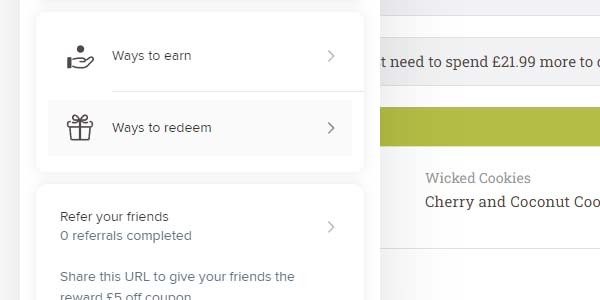
Click the 'Ways to Earn' button (via the Earn Cookie Points button bottom left of your screen).
Click the 'Ways to Redeem' button - you'll see how many points you can redeem.
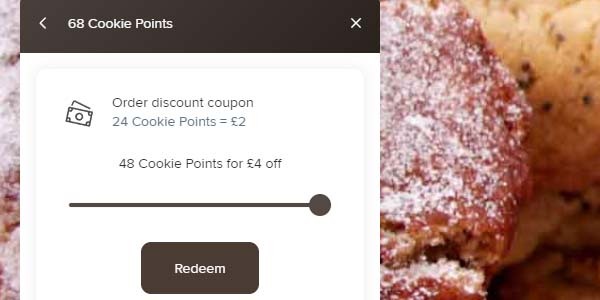
Click the 'Redeem' button and then adjust the slider to decide how many points you want to redeem. You can only redeem points in 24's (essentially a free cookie for each 24 points).
Click the 'Redeem' button again and you'll see a discount code which you can apply to your order.
Press the 'Apply Code' button to automatically apply it to your basket.
If you need any other information on our loyalty program, see our blog post on extra rewards.
That's basically it! If you have any questions about the loyalty program, just get in touch.